


Option Signals -Picker Alerter
4.3242.00 Reviews
App Specs
- Version
- 3.3.11
- Updated On
- License
- Free
- Downloads
- 1,000,000+
- Developer
- Gamma Greeks: AI Stock Option Signals, Flow Alerts
- Categories
- Finance
- Platform
- Android
Screenshots
 Analysis by AppCompare
Options move quickly, but acting on every alert is not the same as making a sound decision. I see Option Signals - Picker Alerter as a companion for keeping an eye on calls and puts as market trends shift, not as a substitute for learning how options work or deciding how much risk I can accept. Its central appeal is straightforward: it aims to put potentially relevant signals in front of me without requiring me to watch a market screen every minute.
What I would use it for during a trading day
A practical way to approach a signal app is to treat it as a prompt to investigate rather than an instruction to trade. If an alert arrives while I am between other tasks, I would first check whether the underlying market context still makes sense, then compare the idea with my own plan. A signal can focus attention, but it cannot tell me whether a position fits my account, goals, or tolerance for loss.
That distinction matters especially with options, where a directionally correct view may still lead to a poor outcome if timing, price movement, or the contract itself does not suit the trade. I would avoid placing an order simply because a notification feels urgent. The more useful habit is to decide in advance what evidence I need before acting and to let an alert start that checklist.
Network-dependent moments
Because the app is built around current signals and alerts, connectivity is part of the experience rather than a minor convenience. I would expect the most useful moments to be those when the phone can receive fresh information and show it promptly. If I am in a place with unreliable service, I would not treat a quiet screen as proof that nothing has changed; I would wait until I can reconnect and check the situation before relying on the app.
This also affects how I would use notifications. They are most helpful when I can respond by opening the app and assessing the signal, not when I am unable to check the surrounding context. I would keep my own trading rules available outside the alert itself, so a brief connectivity interruption does not turn into a rushed decision once service returns.
Using it on a phone without letting it run the day
For me, the sensible mobile workflow is to check the app at deliberate times and let a relevant alert bring my attention back to it, rather than constantly refreshing a screen. That approach makes the phone useful without allowing market noise to interrupt every part of the day. It is a better fit for someone who wants a compact way to monitor options ideas than for someone who needs a full desktop-style research workspace on a small display.
A realistic example would be checking the app during a lunch break, noticing a call or put signal, and saving the decision until I can review the underlying trend and my own risk limits calmly. If the market has moved since the alert, I would reassess rather than assume the original signal is still timely. That small pause is a useful safeguard: alerts can shorten the time it takes to notice something, but they should not remove the time needed to think.
Worth Reading Before You Choose

EA SPORTS FC Mobile 26 Is a Bigger Football Game, but It Takes Time

Flipboard Shows What News Apps Must Do Beyond the Feed

Switching to Android Auto Means Rethinking Your Driving Routine

Google Calendar Makes a Crowded Week Easier to Manage

Ludo King Makes the Most of the Minutes Between Plans

Baby Panda World Brings Quick Play to Modern Phones, but Its Game Library Feels Busy
Where the app fits among trading tools
Compared with opening a broker app repeatedly, an alerts-focused tool can make it easier to notice an options idea without keeping a trading screen in front of me. Compared with broad market-news or charting apps, its stated focus is narrower: calls and puts tied to market trends. That focus can be convenient if options signals are already part of my routine, but it is not a reason to skip independent research or use a broker’s own order and account tools for execution.
I would also keep expectations measured. A signal is an interpretation, not a promise, and a trend can change after an alert appears. Someone who mainly wants long-term investing information, company fundamentals, or a place to execute and manage every part of a portfolio may be better served by a broader finance app or a broker platform. This app makes more sense as one input in a larger process than as the whole process.
Cost, fit, and a few sensible checks
The app is free to download, while optional in-app purchases range from about twelve dollars to around three hundred dollars per item. I would look carefully at what any paid option adds before spending, and decide whether it addresses a real gap in my routine rather than buying on the assumption that a higher price means better trades. The right value test is practical: does it help me review signals more consistently, and can I use that information responsibly?
It is aimed at a broad audience, with an Everyone age rating, but options themselves are not beginner-friendly just because an app is easy to navigate. I would first learn basic terms such as calls, puts, expiration, and risk, and use a cautious approach while building confidence. If I cannot explain why a signal might matter or what could go wrong, I would pass on the trade and use the moment to learn instead.
Failure, recovery, and disciplined use
When a notification is delayed, a connection drops, or the app does not immediately show what I expect, my first move would be to avoid duplicating an action or making a trade based on an old alert. I would reopen the app once service is stable, review the current information, and compare it with my own notes. For time-sensitive decisions, a second source of market information is a sensible backup, not because it replaces the app but because no single phone screen should carry the whole decision.
I would also keep a simple record of which alerts I considered and why I acted or passed. That turns the app into a learning aid: over time, I can judge whether its signals fit my process instead of relying on a vague impression that the notifications are useful. It is a more grounded test than counting how often alerts appear, since frequency alone says little about whether they help me make better choices.
Gamma Greeks: AI Stock Option Signals, Flow Alerts develops the app. It has an average rating of 4.3 from around 9,500 ratings, and more than one million installs. Version 3.3.3 is listed for devices running 7.1 or later. Those figures suggest a sizeable audience, but I would still judge it by whether its approach to signals fits my own habits and the way I manage risk.
Jumping into the world of stock trading can be a bit like diving into a mysterious ocean. Thankfully, there's an app that can serve as a trusty guide: Option Signals - Picker Alerter. I recently took this app for a spin, and let me tell you, it’s got some intriguing features that might just make it your new best friend in the trading world.
First Impressions
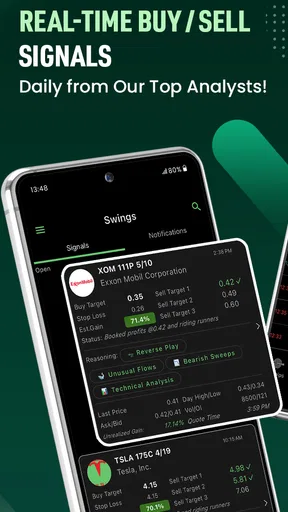
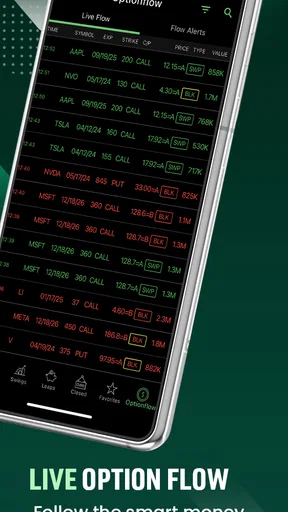
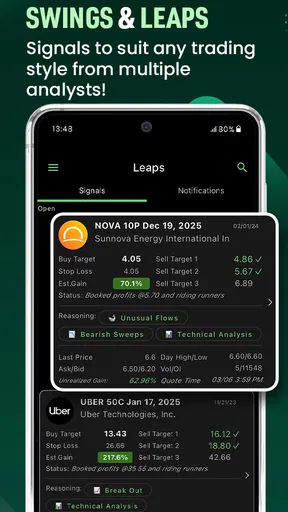
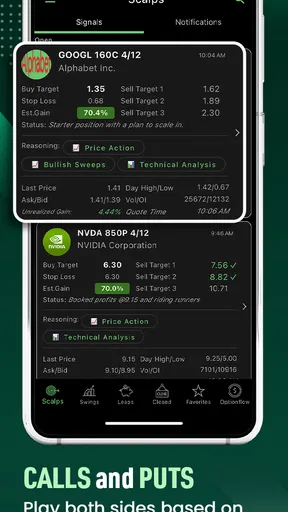
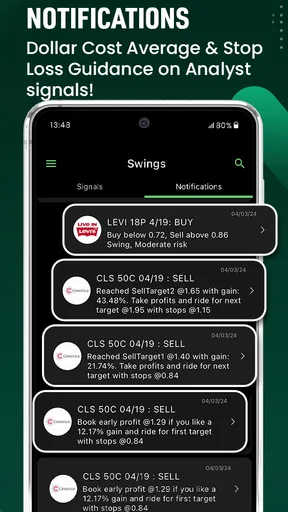
When I first opened Option Signals - Picker Alerter, I was greeted by a sleek and intuitive interface. It didn’t take long for me to get the hang of it, which is a big win if you’re like me and get overwhelmed by complicated dashboards. The main screen provides a neat overview of current options signals, complete with handy alerts. It's like having a knowledgeable friend giving you a nudge when something interesting is happening in the market.
Features That Stand Out
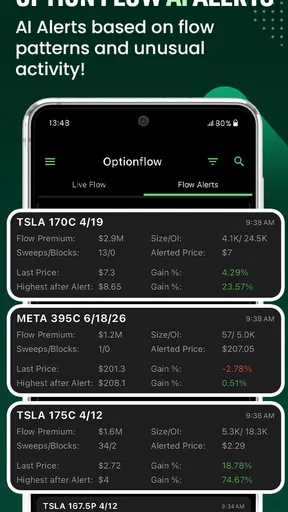
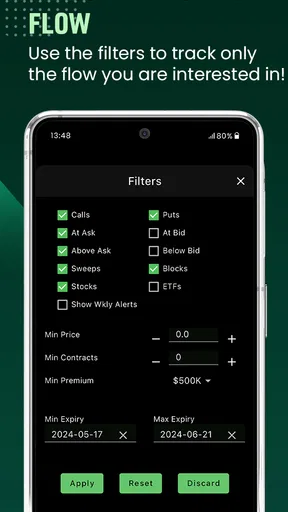
One of the standout features of the app is its real-time alerts. I was impressed by how quickly the notifications came through, allowing me to act promptly. The alerts are customizable, so you can tailor them to fit your trading strategy. Whether you’re a day trader or prefer a more laid-back approach, the app has got you covered.
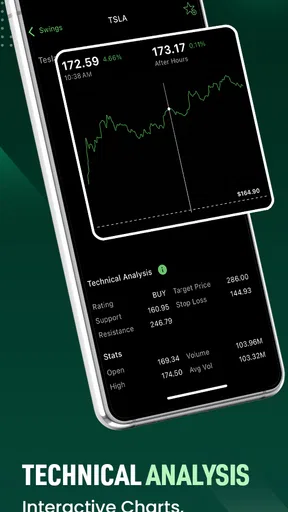
The app also boasts a comprehensive analysis tool. It breaks down complex data into digestible insights, which is perfect for those who want to understand the market trends without getting bogged down by too much jargon. I found the visual charts particularly helpful; they make it easy to see patterns at a glance.
Digging Deeper into the Data
For those who love to dive deep into the data, the app provides detailed analysis on various options. You can track historical performance, compare different options, and even get a sense of market volatility. This feature is a goldmine for anyone who loves to base their decisions on solid data. I spent a good amount of time exploring this section, and it definitely gave me a better understanding of the market.
My strongest practical tip is to give each signal a consistent review rather than judging it by how compelling it looks on screen. I would note the market context, the reason I considered the idea, and whether I ultimately acted. That makes it easier to spot when I am following a repeatable plan and when I am simply reacting to an alert. Historical information is useful for reflection, but I would not treat past performance as a guarantee that the next signal will behave similarly.
Ease of Use
Now, let’s talk about the user experience. The app is designed with simplicity in mind, which is a huge plus for beginners. It’s easy to navigate, and the learning curve isn’t steep. I appreciated the straightforward tutorials and FAQs that provide a good starting point for newbies. Even if you’re a seasoned trader, you’ll find the simplicity refreshing, allowing you to focus on what really matters—trading successfully.
The trade-off is that a friendly interface can make complicated decisions feel deceptively simple. I would use the clear presentation to understand what the app is flagging, then move beyond the headline and consider the possible downside. New options users should not confuse ease of navigation with low financial risk. If I were still learning, I would use the app to become familiar with how signals are presented before making them part of a real-money routine.
Data use and attention
Fresh signals and alerts naturally make this a connected experience, so I would be mindful of when I check it and how often I allow notifications to pull me back to the phone. If I am travelling or using limited mobile data, I would reserve checks for moments when I can review the information properly rather than repeatedly reopening the app. That is not just about conserving attention: frequent quick glances can encourage impulsive choices without giving me enough time to understand a potential trade.
I would also avoid leaving an alert unread as though it were a standing recommendation. The value of a notification depends on the market context at the time I review it. A short note about why I dismissed or followed a signal helps me separate useful prompts from noise and makes later reflection more honest. For a person who checks markets only occasionally, this deliberate approach may be more useful than trying to follow every change.
Community and Support
Another feature that caught my eye was the community aspect. The app has a forum where users can share tips, strategies, and experiences. It’s a great place to learn from others and even share your own insights. Plus, if you ever hit a snag, the customer support is responsive and helpful, which is always reassuring.
I would treat community discussion as a place to compare perspectives, not as confirmation that a trade is safe. Different users can have different time horizons, experience levels, and risk limits, so advice that sounds convincing may not suit my circumstances. The same caution applies to any support conversation: practical help with using an app is different from a personal assessment of whether a particular options position is right for me.
Who should choose another tool
This app is most compelling for someone who already follows options and wants a signal-oriented view to complement a separate research and execution routine. It is less suitable for a person looking for a complete investing platform, a guaranteed path to profit, or a replacement for learning how contracts work. If my main goal were to study company financials, manage a diversified long-term portfolio, or place and monitor orders in one place, I would start with a tool built around those needs instead.
There is also a good reason to skip it if push alerts would make me trade more often than my plan allows. Being reachable all day is not automatically an advantage in a fast-moving market. Someone who prefers scheduled reviews, slower investing decisions, or minimal phone interruptions may get more value from a regular research routine than from another source of prompts.
Final Thoughts
Overall, Option Signals - Picker Alerter delivers a robust set of tools for anyone interested in trading options. It combines real-time alerts, in-depth analysis, and a user-friendly interface to create a powerful trading companion. Whether you're just starting your trading journey or you're a seasoned pro, this app offers valuable insights that can help you make informed decisions.
So, if you’re ready to take your trading game to the next level, why not give Option Signals - Picker Alerter a try? You might just find it to be the perfect ally in navigating the unpredictable waters of the stock market.
My connectivity verdict
My overall view is that the app is best treated as a convenient signal monitor, with a dependable connection and a deliberate decision process doing much of the work around it. When service is interrupted, I would verify what is current before acting; when service is available, I would still treat each prompt as a reason to investigate, not an order. That balance lets the app support an options routine without handing it control of my attention or my risk.
For someone who already understands calls and puts, wants market-trend alerts on a phone, and is comfortable checking signals against independent judgment, it may be a useful addition. For a beginner expecting alerts to remove uncertainty, or for anyone needing a full brokerage and research workspace, I would choose a different starting point. The app is free to try, but its strongest use comes from pairing timely prompts with patience, context, and a clear limit on what I am willing to risk.
Pros
- User-friendly interface for quick navigation.
- Real-time alerts for timely decision-making.
- Customizable settings tailored to user needs.
- Multiple signal options for diverse strategies.
- No subscription fees for basic features.
Cons
- Limited advanced features without premium.
- Occasional delay in alert notifications.
- Ads can be intrusive for free users.
- Requires stable internet for accuracy.
- Limited support for non-English speakers.
FAQs for Option Signals -Picker Alerter
What is Option Signals - Picker Alerter and how does it work?
Option Signals - Picker Alerter is a mobile application designed to assist users in making informed decisions about stock market options trading. The app provides real-time alerts and signals based on market data analysis. Users receive notifications about potential trading opportunities, helping them optimize their investment strategies.
Is Option Signals - Picker Alerter suitable for beginners in trading?
Yes, Option Signals - Picker Alerter is designed to cater to both beginners and experienced traders. It offers user-friendly features and educational resources that help newcomers understand the basics of options trading. The real-time alerts and guided suggestions make it easier for beginners to start trading confidently.
What platforms is Option Signals - Picker Alerter available on?
Option Signals - Picker Alerter is available on both Android and iOS platforms. Users can download the app from the Google Play Store or the Apple App Store. The app is optimized for mobile devices, allowing users to access the latest trading signals and updates on the go.
Are there any subscription fees or in-app purchases involved?
Option Signals - Picker Alerter offers both free and premium subscription options. The free version provides basic features, while the premium version unlocks advanced tools and more frequent alerts. Users can choose a subscription plan that best suits their trading needs, with various pricing tiers available.
How reliable are the signals provided by Option Signals - Picker Alerter?
The signals in Option Signals - Picker Alerter are generated through sophisticated algorithms and market analysis. While the app aims to provide accurate and timely information, it is important for users to conduct their own research and use the signals as part of a broader trading strategy. No trading platform can guarantee success.


